- Access exclusive content
- Connect with peers
- Share your expertise
- Find support resources
07-27-2016 08:18 AM
Hello all,
We seem to have an issue with sip sessions being stuck in the session monitor for weeks and sometimes months. There have been instances, albeit extremely rare, where it prevented new sessions from being formed on a sip trunk we were testing (it's being moved off of the firewall for production). Once I cleared the stuck session we were able to make calls again. The phones themselves are Polycom. I have ALG turned off on all firewalls and the sip application timeout has been adjusted from 3600 seconds to 20 seconds. The timeout adjustment seemed to help but I still see stuck sessions every so often. Anything else that can be checked or adjusted? I'm not much of a phone system expert so this is a little out of my realm.
05-12-2022 06:06 AM
Hey All, same issue for us as well. We have the sip session timeout less than 1 hour, but we still get the same issue. For me, it seems to occur after a FW failover (we have active/passive). And the old sessions sits there for the day or longer if its not noticed, and then prevents calling.
09-10-2022 09:55 AM
Did you ever find a solution to this?
03-13-2023 08:11 AM - edited 03-13-2023 08:13 AM
This can be a common behavior with UDP sessions like SIP and IKE stuck in that state if the traffic is matching the same session continuously and gets refreshed because with SIP sessions you will see traffic on 5060 and for IKE 500 as the ports. If you have active calls and IKE traffic traversing through the firewall constantly it would match the same session and gets refreshed they tend to stay in an Active state for longer time. If you don't want that to happen you can work with timeout values. This KB article might help you understand a scenario on why you need to adjust timeout value for SIP session
https://knowledgebase.paloaltonetworks.com/KCSArticleDetail?id=kA10g000000Clg7CAC
There's a possibility that due to any reason this sessions can go into Discard state and be a stale session. A session in discard state will continue to be refreshed and discard traffic as long as the arriving traffic matches the discard session basically 6 tuples. Particularly with UDP traffic, you can end up stuck in this state.. At this point of time you will see traffic incrementing on total byte count in session info. And the only way is to manually clear the session. I hope this clarification helps.
03-15-2023 10:43 PM - edited 03-15-2023 10:48 PM
You can also automate this with changing the variables as @ypopuri said and Palo Alto Cortex XSOAR (there is a free community edition for you to see if you like it) or with Ansible panos_config_element module for example as when failover is seen in the logs the config to be autochanged and maybe after time to again be auto changed and returned to normal https://paloaltonetworks.github.io/pan-os-ansible/modules/panos_config_element_module.html
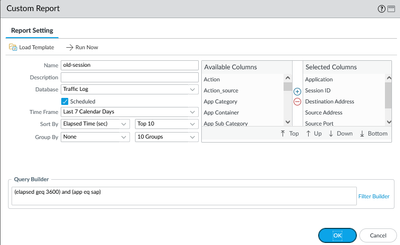
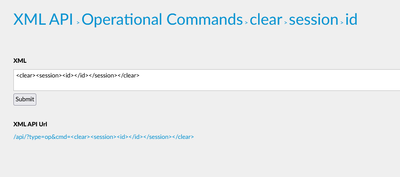
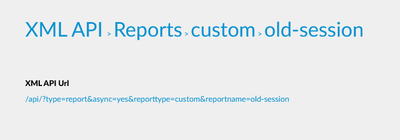
Outside of that you can also schedule a custom report each night with SIP application elapset time (you can even schedule or send the report by email) then get this report via API and and again with API to delete the sessions by using their ID.
There are also Ansible modules for operational commands and for reports as I did not find an exact Ansible module you can use the URI module to get the report:
https://paloaltonetworks.github.io/pan-os-ansible/modules/panos_op_module.html
https://docs.ansible.com/ansible/latest/collections/ansible/builtin/uri_module.html
Also palo alto has another way with using '<show><session><all><filter><min-age>{{ session_min_age }}</min-age></filter></all></session></show>' :
https://github.com/PaloAltoNetworks/ansible-playbooks/blob/master/session_report.yml
10-09-2025 03:11 AM
Hi JDelaney
Did you ever find a solution to having this problem after a failover?
10-22-2025 12:28 PM
Hello,
Check the timers on your session timeouts:
Regards,
12-17-2025 06:13 AM - edited 12-17-2025 06:13 AM
I've just been bitten by stale sessions where the target zone was wrong. During a network migration, a route was briefly lost on the firewall, and it then punted traffic back out to the WAN via the default route. Having a bidirectional policy rule meant the firewall happily created a session from WAN to WAN. As this was SIP traffic and the remote end tried to reestablish the SIP trunk, the 'faulty' session never timed out. Thus, when the firewall routing was restored it happily blackholed allowed traffic as the session destination zone no longer matched.
Does anyone know of a way to automatically (and ideally autonomously) clear such sessions when the routing on the firewall changes? The above issue is very rare as it happened during a change window, and given the multiple levels of redundancy, I do not expect a repeat during normal operation.
12-19-2025 10:18 AM
Hello,
Check the settings on for the sessions:
Device tab-> Setup-> Session
Click the ? to help you decide what is important in your environment. Here is what I have set per STIGs.
Regards,
12-20-2025 12:25 PM - edited 12-20-2025 12:36 PM
Nothing out of the ordinary there. So, apart from reducing the Discard UDP to less than 60 seconds, it depends more on what retry timer a client has set on their side, whether the session remains active. My understanding is that each received packet that matches the session refreshes the timer.
The client in question was sending a SIP invite every four seconds...
Click Accept as Solution to acknowledge that the answer to your question has been provided.
The button appears next to the replies on topics you’ve started. The member who gave the solution and all future visitors to this topic will appreciate it!
These simple actions take just seconds of your time, but go a long way in showing appreciation for community members and the LIVEcommunity as a whole!
The LIVEcommunity thanks you for your participation!