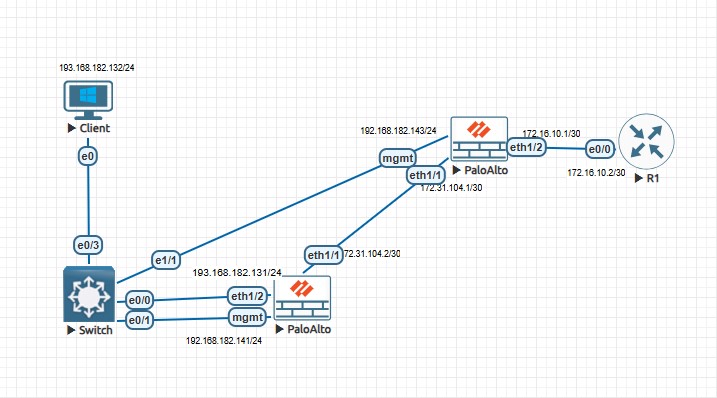
Palo Alto Site to Site VPN ipsec tunnel up but unable to ping Source to destination

cancel
Showing results for 
Show  only  | Search instead for 
Did you mean: 

Palo Alto Site to Site VPN ipsec tunnel up but unable to ping Source to destination

L0 Member

Dear Team, 


When I am doing implement Site to Site VPN  ipsec tunnel then tunnel status is down & Ike gateways is down after test commands manually trigger negotiation, then all up. But still source to destination unable to ping.


Already on virtual router point to tunnel interface for all traffic on both firewall. On security policies allow both zone on both firewall but still same. Allow ICMP on tunnel interface & other physical interface. Please help what should i do next.


All configuration are attached for your reference.

4 REPLIES 4

L6 Presenter

Do you have an IP setup on the tunnel interface attached to the IPSec tunnel? This is not required but helpful to diagnosis if the tunnel is passing traffic (used for CLI tests to verify ping responds on the tunnel from the far side and used in tunnel monitoring if wanted).


Do you see packets being encrypted/decrypted going across the IPSec tunnel between your sites? Network->IPSec Tunnels->Tunnel info, you should see "PKT ENCAP" and "PKT DECAP". These are packets encapsulated/decapsulated in the IPSec to send/receive across the tunnel.


Do you have a NAT rule? It may be NAT'ing the traffic before being put into the IPSec tunnel.


Turn on full logging with "log at session start" as well as end and examine the start/end logs to see if your destination is changing. Also turn on logging on the built-in inter/intrazone-default rules (Policies->Security->[default-rule-name]->Override and then enable logging in the rule) to see if something unexpected is occurring.


Cyber Elite

Hello,

Check the logs as to why the traffic is not making it. Could be a missing Security Policy.


Regards,

L0 Member

hello, Issue resolved when I am adding default route in virtual router including tunnel route. But still in monitor traffic show aged out session end reason.

L6 Presenter

If the traffic was ping or DNS then "aged-out" is the normal end reason (for any ICMP or UDP protocol traffic really). TCP traffic should normally end in a "tcp-fin", thought you may also see "tcp-rst" or "aged-out" depending on the application and server. If you see both "packets sent" and "packets received" in the logs then traffic is likely making it through.

  • 296 Views
  • 4 replies
  • 0 Likes
Like what you see?

Show your appreciation!

Click Like if a post is helpful to you or if you just want to show your support.

Click Accept as Solution to acknowledge that the answer to your question has been provided.

The button appears next to the replies on topics you’ve started. The member who gave the solution and all future visitors to this topic will appreciate it!

These simple actions take just seconds of your time, but go a long way in showing appreciation for community members and the LIVEcommunity as a whole!

The LIVEcommunity thanks you for your participation!