PA3250 cant ping external interface public ip from internal ip but can ping any other ip

cancel
Showing results for 
Show  only  | Search instead for 
Did you mean: 
Announcements
Scheduled Maintenance: November 14–15 (starting Nov. 14 at 12:00 AM PST)
LIVEcommunity will temporarily operate in read-only mode as we prepare to welcome Idira!
Public content will remain accessible, but log-ins, posting and community interactions will be paused during this period. Thank you for your patience!

PA3250 cant ping external interface public ip from internal ip but can ping any other ip

L2 Linker

Hi there,


I can ping any other ip even though internet is working fine but when i tried to ping External public interface ip from internal  its not rechable.

there is a internal to internet policy allowing ping and any other application.


Thanks

7 REPLIES 7

L7 Applicator

Did you add an interface management profile to the external interface?


--> https://docs.paloaltonetworks.com/pan-os/8-1/pan-os-admin/networking/configure-interfaces/use-interf...

Yes, I added an interface management profile to the externral interface. if i removed the profile do you think it will reslove the issue?


Hello,

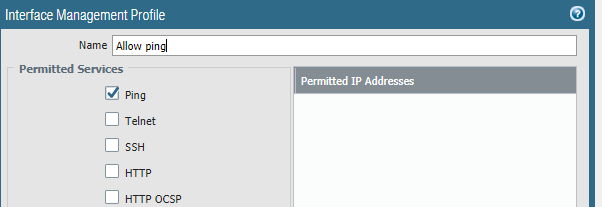
No it would not. the profile needs to have the ping option checked:


image.png

I've already ping checked in the profile without Permitted IP Address.

Hello,

Are you trying to ping that interface from 'inside' the network or from a true external source such as a website that performs test pings?


Please advise,

I am trying to ping it from inside interface private IP  to external public IP 


Hello,

I would then make sure you have a u-turn NAT configured.


https://knowledgebase.paloaltonetworks.com/KCSArticleDetail?id=kA10g000000ClEiCAK


Cisco calls it a hairpin. 


Regards,

  • 8158 Views
  • 7 replies
  • 0 Likes
Like what you see?

Show your appreciation!

Click Like if a post is helpful to you or if you just want to show your support.

Click Accept as Solution to acknowledge that the answer to your question has been provided.

The button appears next to the replies on topics you’ve started. The member who gave the solution and all future visitors to this topic will appreciate it!

These simple actions take just seconds of your time, but go a long way in showing appreciation for community members and the LIVEcommunity as a whole!

The LIVEcommunity thanks you for your participation!