URL Category - Is a trailing / necessary when adding sites?

cancel
Showing results for 
Show  only  | Search instead for 
Did you mean: 
Palo Alto Networks Approved
Community Expert Verified

URL Category - Is a trailing / necessary when adding sites?

L1 Bithead

This question relates to the creation of URL Category objects. When adding a new site, PAN-OS shows the following disclaimer:

"For domain entries, we recommend you use an ending token. Acceptable tokens are: . / ? & = ; +. If you choose not to use an ending token, you may block or allow more URLs than anticipated. For example, if you want to allow xyz.com and enter the domain as 'xyz.com,' you will allow xyz.com and URLs such as xyz.com.random.com. However, if you enter the domain as 'xyz.com/,' you will only allow xyz.com."


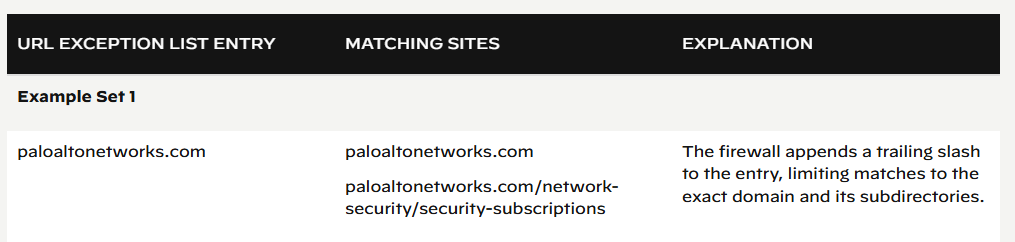
However, this seems to conflict with the Advanced URL Filtering guidelines here: Guidelines for URL Category Exceptions

See attached images.


The guidelines say:

"The firewall appends a trailing slash to the entry, limiting matches to the exact domain and its subdirectories."


Seeming to suggest that appending a trailing slash (/) is not necessary, as the firewall will implicitly add a trailing slash, even if you do not add it.

But then the disclaimer tells me I should add it explicitly.


My question. I want to have an entry that

match:
google.com/
google.com
google.com/sub1
google.com/sub1/sub2

does NOT match:
google.com.example.eu


Should I use

google.com/

OR

google.com

OR

are they equivalent in execution (which the docs seem to suggest)?

1 accepted solution

Accepted Solutions

Cyber Elite

in older PANOS versions the trailing slash was necessary to end the entry

newer PANOS versions add that trailing slash automatically, but you can turn this feature off at which time you again need to add the trailing slash manually


you can find that feature toggle in Device > Setup > Content-ID > URL Filtering >  Append Trailing Slash


hope that helps

Tom Piens
PANgurus - Strata & Prisma Access specialist

View solution in original post

2 REPLIES 2

Cyber Elite

in older PANOS versions the trailing slash was necessary to end the entry

newer PANOS versions add that trailing slash automatically, but you can turn this feature off at which time you again need to add the trailing slash manually


you can find that feature toggle in Device > Setup > Content-ID > URL Filtering >  Append Trailing Slash


hope that helps

Tom Piens
PANgurus - Strata & Prisma Access specialist

Clear, thank you for your response!

  • 1 accepted solution
  • 2498 Views
  • 2 replies
  • 0 Likes
Like what you see?

Show your appreciation!

Click Like if a post is helpful to you or if you just want to show your support.

Click Accept as Solution to acknowledge that the answer to your question has been provided.

The button appears next to the replies on topics you’ve started. The member who gave the solution and all future visitors to this topic will appreciate it!

These simple actions take just seconds of your time, but go a long way in showing appreciation for community members and the LIVEcommunity as a whole!

The LIVEcommunity thanks you for your participation!