Let’s walk through how to set up a web server for the “IP Change Event Notification URL option” in Prisma Access.
1. Install Linux Ubuntu in Azure or in anywhere (but should be public access).
2. Install the simple python command as below to make the HTTP web server.
paloalto@URL-Server:~$ sudo curl -L https://raw.githubusercontent.com/nickjj/webserver/v0.2.0/webserver -o /usr/local/bin/webserver && sudo chmod +x /usr/local/bin/webserver

3. Turn on the HTTP web server use this command (you can change the port number).
paloalto@URL-Server:~$ webserver 0.0.0.0:5000

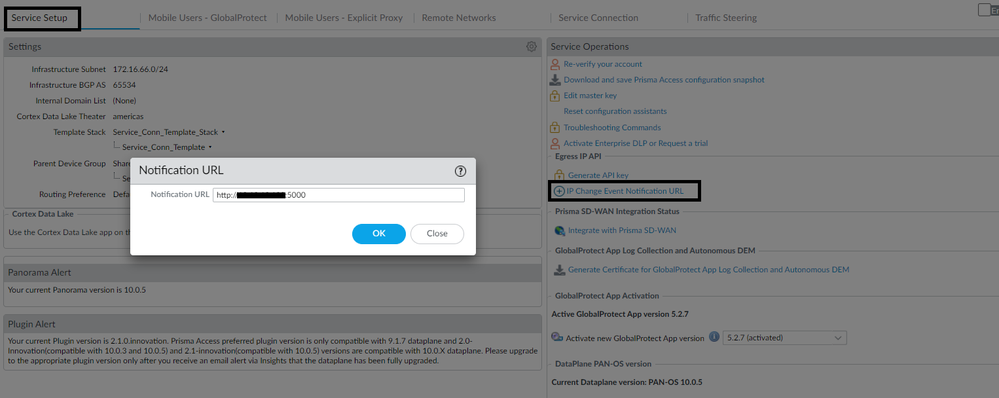
4. Now, in Prisma Access, you need to add the IP/URL of the server to the IP Change Event Notification URL option:
5. Now any IP change, even in Prisma Access, the HTTP server will get a notification like what we see below:
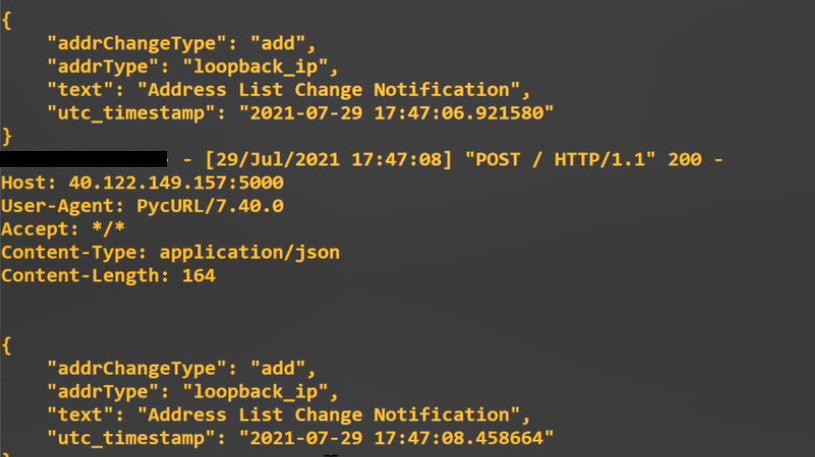
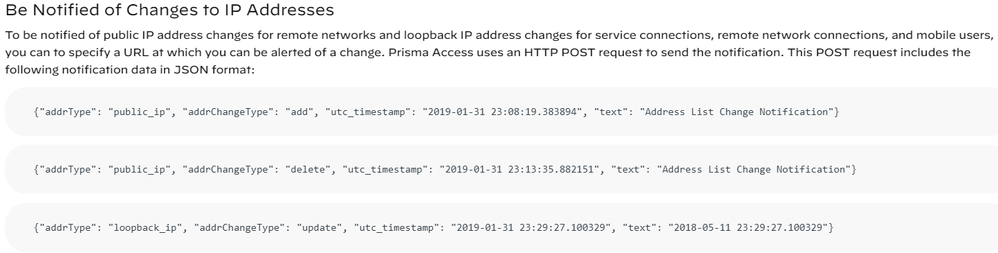
All notification will be in Json and under three categories:
Add/Delete/Updates
Check out this video on IP Change Event Server Steps.
Resources:
Web Server github
Retrieve the IP Addresses for Prisma Access
Special thanks to Karam Hanna for his amazing help.
Thank you for reading!