This website uses Cookies. By clicking Accept, you agree to the storing of cookies on your device to enhance your community and translation experience. Read our Privacy Policy.
Click Preferences to customize your cookie settings.






Application Dependency or "Depends on" (how it is listed inside of the Application details inside of Objects > Applications > application detail window) is a list of applications that are required for this application to work properly.
If you do not allow the application and its dependency through the Palo Alto Networks firewall, then the application will not work.
Note: There is also a "Implicitly Use Applications" field that you need to recognize. The "Implicitly Use Applications" is a subset of "Depends on," and the dependent applications are implicitly allowed. The application still does depend on these applications, however they do NOT need to be explicitly permitted in security policy. Dependent applications can be allowed implicitly, when the firewall is able to determine the correct application by a specific point in the session.
For more information on checking Application Dependency, please see this doc:
Check if an Application Needs Explicitly Allowed Dependency Apps
Let's take two applications as examples: facebook-base and facebook-posting.
facebook-base:
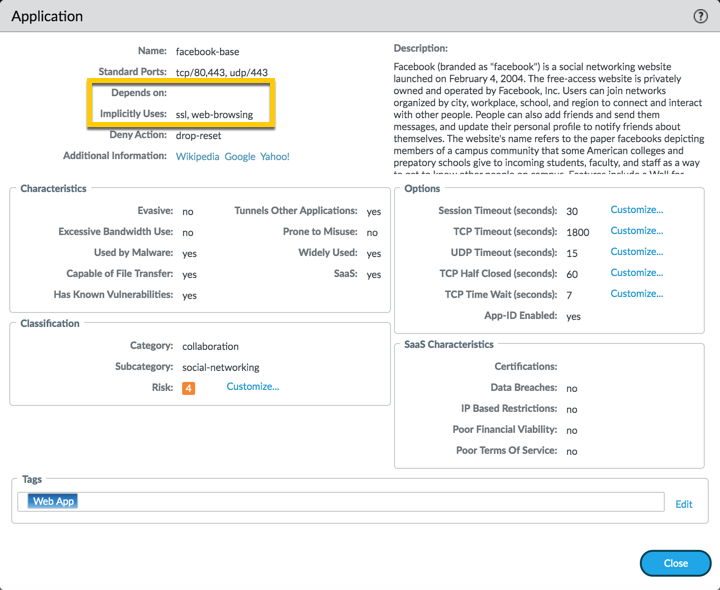
Looking at the application detail window for facebook-base, you can see 2 things listed:
This mean, if you allow facebook-base in a rule, no other applications are needed:

facebook-posting:
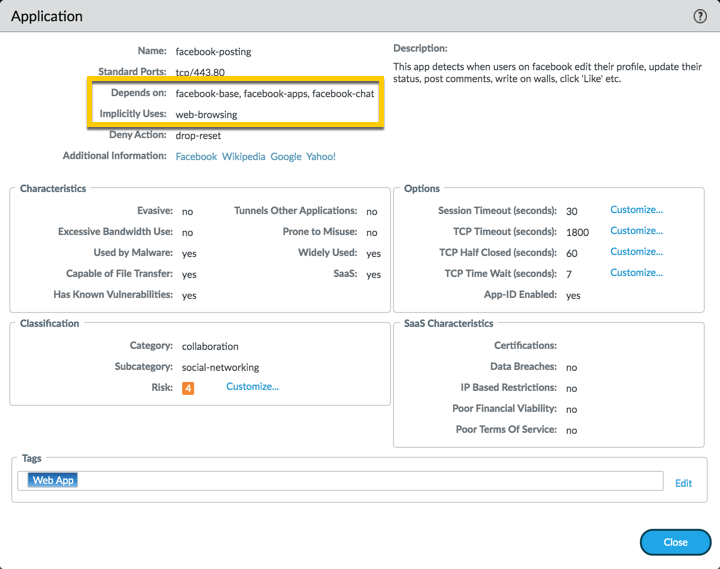
Looking at the application detail window for 'facebook-posting, you can see 2 things listed.
So, in order to allow the facebook-posting application, you will have to add the 'Depends-on' applications in the same rule. You can immediately select them when you select facebook-posting application and add them to your rule as displayed below (or you can also search and add them individually through the applications):
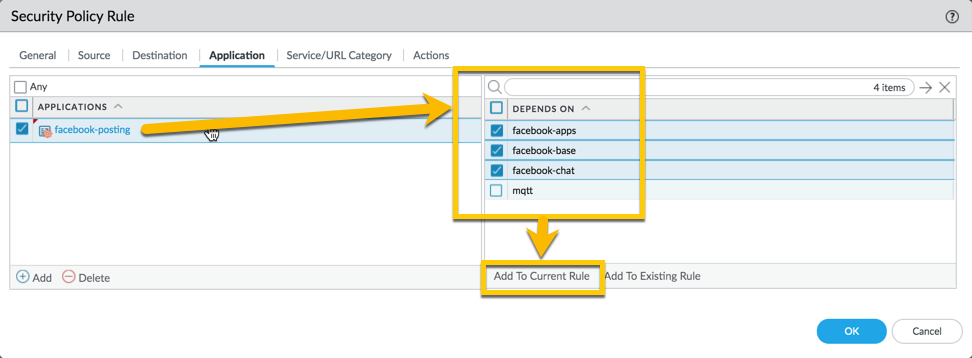
You'll end up with a rule that looks like this:

When the first TCP packet is received (SYN), the firewall must setup a session. Since the application can not be detected on a TCP session until at least one data packet traverses the device, the application will be incomplete. For the firewall to determine if it should even allow the SYN packet through it must do a security policy lookup.
Because the application is not known when the SYN packet is received the application portion of the security policies can not be applied. As a result, the security policy lookup is performed against the 6 tuples of the session, source and destination IP and port, ingress interface (actually zone) and protocol. The first policy, which matches these 6 tuples, will be used to allow the SYN and any additional packets that traverse the firewall before the application is identified.
It is always a good idea to look at any new application details first to determine what the security rule might need to allow the application to work properly.
Also check the following links on the topic :
Thanks for taking time to read this blog.
Don't forget to hit that Like (thumbs up) button and don't forget to subscribe to the LIVEcommunity Blog.
As always, we welcome all comments and feedback in the comments section below.
Kiwi out !
You must be a registered user to add a comment. If you've already registered, sign in. Otherwise, register and sign in.
| Subject | Likes |
|---|---|
| 3 Likes | |
| 3 Likes | |
| 2 Likes | |
| 1 Like | |
| 1 Like |


