PAN OS 11 and DHCPv6 with Prefix Delegation

cancel
Showing results for 
Show  only  | Search instead for 
Did you mean: 

PAN OS 11 and DHCPv6 with Prefix Delegation

L1 Bithead

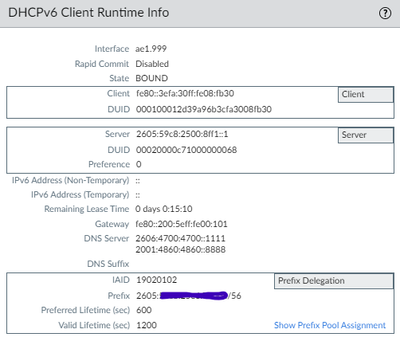
I wanted to make sure I had the settings correct for configuring DHCPv6 on my WAN interface for Starlink. I can confirm that I did get an allocation of IPv6 addressing with a /56 prefix and was successfully able to get an IPv6 address assigned to my internal interface.


The issue is, it appears I have not gotten an actual perm or temp address on my WAN interface, although I did get a Prefix delegation? I did accept the RA on the external side, but no actual route was placed into the routing table yet. 


Would this be an issue on ISP side? or my side? I believe it to be on the ISP side, but I could be wrong. 


ChazKlinkbeil_0-1705503939918.png


5 REPLIES 5

L1 Bithead

I figured it out. WAN interface will not get its own IPv6 address...just had to put the link local default route in and then everything started working. SLAAC was working with internal clients as well.

L0 Member

Thanks for the solution, this was the last piece of the puzzle to get IPv6 working 👏


Got the link local IPv6 IP from the WAN interface with command "show interface all" and made this static route:


Default route.png

So does this mean I will never see an ipv6 on the WAN interface when it faces starlink?
I'm asking because I am trying to set up globalprotect behind starlink via ipv6, and it appears I cannot due to no ipv6 assigned to this interface.

L0 Member

@Mike_Hutchinson For Globalprotect you can use the interface you've selected for prefix delegation. In my case this interface has a valid ipv6 address. (CLI: show interface all)

L1 Bithead

yeah, I ended up not using the IPv6 addresses as literally nobody uses it outside of some corporations and mobile devices...etc...... In order to actually get to that IPv6 address, the source users would have to have it also implemented and used. 

  • 2386 Views
  • 5 replies
  • 0 Likes
Like what you see?

Show your appreciation!

Click Like if a post is helpful to you or if you just want to show your support.

Click Accept as Solution to acknowledge that the answer to your question has been provided.

The button appears next to the replies on topics you’ve started. The member who gave the solution and all future visitors to this topic will appreciate it!

These simple actions take just seconds of your time, but go a long way in showing appreciation for community members and the LIVEcommunity as a whole!

The LIVEcommunity thanks you for your participation!