stream timeout

cancel
Showing results for 
Show  only  | Search instead for 
Did you mean: 

stream timeout

L0 Member

Hello Palo Alto World!


We are experiencing a "stream timeout" error when visiting srm.gzhtdq.com.cn (see also stream_timeout.png). When we disable GlobalProtect and do not use the VPN Tunnel, then the website works. I excluded the website from decryption, but it didn't help.


I am not sure what the issue for this could be. The application being recognized is ssl. If we decrypt, then it is web-browsing.


Thanks in advance.


Kind Regards


2 REPLIES 2

Community Team Member

Hi @I.Erdurucan ,


What do the traffic logs look like for this connection? Im particularly interested in bytes sent, bytes received, and session-end reason. With an issue like this, there can be a number of issues that relate to MTU/Security Profiles/Routing.


Before getting into the weeds further, can run a quick curl test both with and without GP:

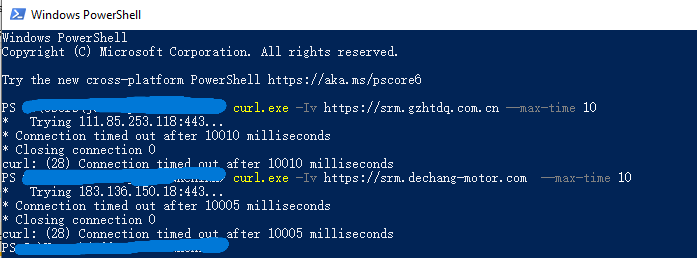
curl -Iv https://srm.gzhtdq.com.cn --max-time 10


Also... do you have an internal client in your trust zone that you can test from? If the stream works from a host on the internal network but fails only through GP, that helps narrow the scope. If it fails internally as well, then we know the behavior isn’t tied to the tunnel at all.


A quick low-effort test you can try right away is to temporarily remove security profiles from the security policy that governs this connection. If you have a general outbound internet rule, I’d suggest creating a separate allow rule just for this site during testing. This helps isolate whether Threat Prevention or URL Filtering is influencing the stream timeout.


Those are just a few things I would personally start out with to figure out what could be done without having to run a full on packet capture.


LIVEcommunity team member
Stay Secure,
Jay
Don't forget to Like items if a post is helpful to you!

Please help out other users and “Accept as Solution” if a post helps solve your problem !

Read more about how and why to accept solutions.

Hii @JayGolf,


firstly, thank you for your support!


So, regarding the low-effort test: The result was that it still does not work. But before this change, it was the error shown in the previous screenshot. This time, we have a "This page isn't working right now". ERR_Empty_Response.


In the logs, everything looks fine:


sub-type: end

session-end-reason: tcp-fin

Bytes-statistic, see bytes.png


see curl-png for output of your provided command.


EDIT: The issue occurs in the office as well 

Best,

Ibrahim

  • 471 Views
  • 2 replies
  • 0 Likes
Like what you see?

Show your appreciation!

Click Like if a post is helpful to you or if you just want to show your support.

Click Accept as Solution to acknowledge that the answer to your question has been provided.

The button appears next to the replies on topics you’ve started. The member who gave the solution and all future visitors to this topic will appreciate it!

These simple actions take just seconds of your time, but go a long way in showing appreciation for community members and the LIVEcommunity as a whole!

The LIVEcommunity thanks you for your participation!