Cortex XDR Tenant Auto-Upgrade 3.17 → 5.0: UI mixed theme, AI pages stuck loading, Marketplace/Playbook Catalog empty + ingestion quota warning

cancel
Showing results for 
Show  only  | Search instead for 
Did you mean: 

Cortex XDR Tenant Auto-Upgrade 3.17 → 5.0: UI mixed theme, AI pages stuck loading, Marketplace/Playbook Catalog empty + ingestion quota warning

L1 Bithead

I tried to open a Support case, but none of the available issue categories allowed me to create a case and I was redirected to Live Community for assistance. I’m posting here to get guidance on the likely root cause and recommended next steps.


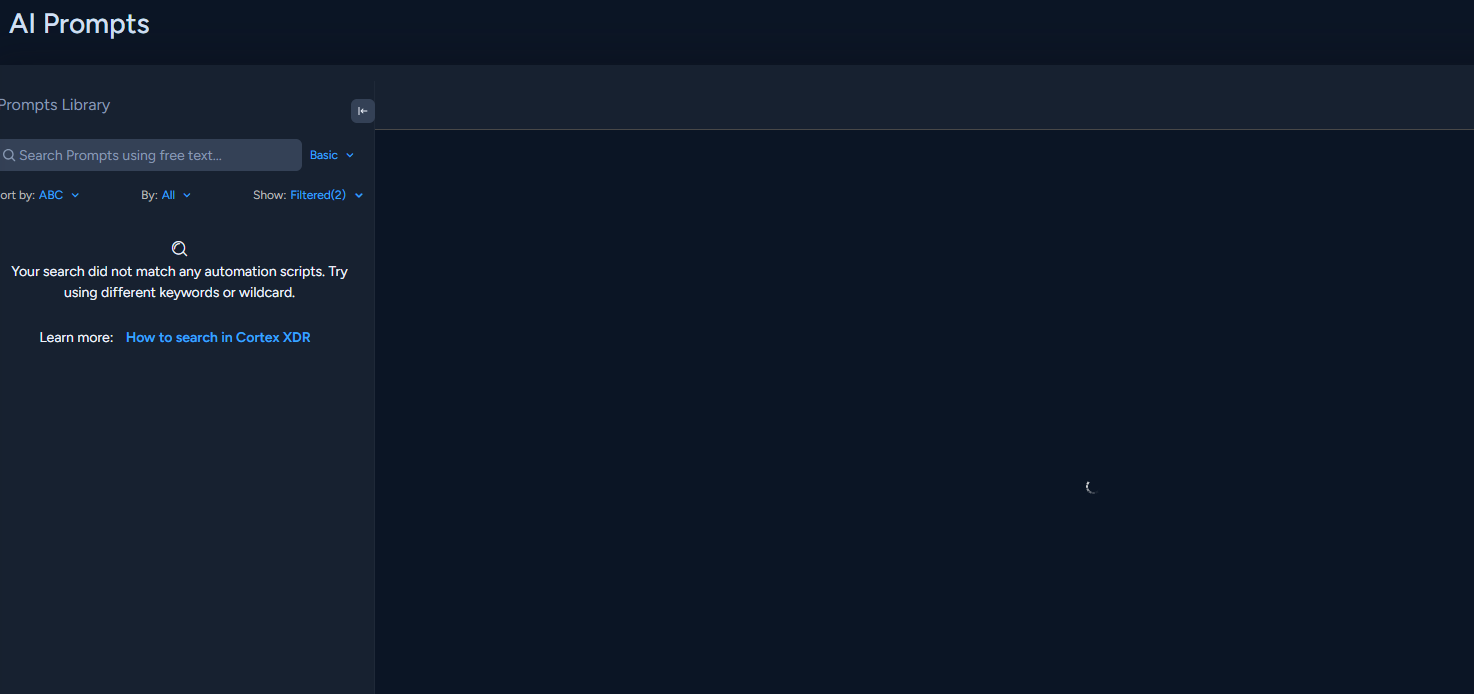
After an automated upgrade from 3.x to 5.0, multiple UI and feature issues appeared. Pages look like a mix of old and new UI themes, and several pages (mostly AI-related) are stuck on loading with no visible error. Additionally, Marketplace and Playbook Catalog are empty (I expected predefined playbooks).
We have two active tenants under the same account, and both tenants show the same behavior.

Impact

  • AI/Agentic Assistant is unusable (infinite loading)

  • Several pages do not load at all

  • Marketplace/Playbook Catalog empty (no predefined content)

  • Possible data processing delays due to ingestion quota warning

Symptoms / Observations

  1. Mixed UI theme (old and new theme appears together on different pages).

  2. AI pages not loading, especially AI Prompt / Agentic Assistant (constant loading spinner).

  3. Marketplace and Playbook Catalog are empty.

  4. Tried:

    • Multiple browsers

    • Incognito mode

    • Same results in all scenarios

  5. No explicit UI error messages, but there is a new banner/alert at the top:

“Based on a 7 day average calculation from February 2nd 2026 to February 9th 2026, your daily default ingestion quota is exceeded. Increase your license limit or reduce your daily ingestion; otherwise, you can expect data processing delays or data not being collected by the application.”

We currently have Pro Per Endpoint License + XTH add-on only. As far as I know, since we cannot ingest third-party logs with this license, I didn’t expect an ingestion quota warning. This warning might be related to the UI/feature issues.

Upgrade context

  • Tenant was upgraded directly from 3.x to 5.0

  • Tenant never reached version 4 prior to this

  • Issues started right after the upgrade

ABOUT (Tenant details)

Cortex XDR V5.0
Role: Account Admin

UI VERSION:

  • Version: xsiam--master-platform-v5.0.0-7043508-ge5d098db

  • Branch: master-platform

  • Build Time: Feb 7th 2026 05:26:33

SERVER VERSION:

  • Version: master-platform-v4.4.0-3768-g2ade4-2ad8

  • Automation Version: 8.13.0-6999485

  • Build Time: Feb 7th 2026 02:35:23

  • Deployment Time: Feb 8th 2026 22:48:29

  • XQL Content Version: master-platform-v4.4.0-135-g71e2

  • XDM Content Version: master-platform-v4.4.0-110-g7909

  • Palo Alto Networks Latest Content Version: 2130-30377

  • WildFire Server: eu.wildfire.paloaltonetworks.com

Questions

  1. Is this mixed UI / infinite loading behavior a known issue after upgrading to 5.0?

  2. With Pro Per Endpoint + XTH only, why would we see an ingestion quota warning (no third-party logs expected)?

  3. Any recommended troubleshooting steps to validate whether this is a backend update/incomplete deployment issue (e.g., specific tenant checks, status pages, required content sync, etc.)?

  4. What’s the best way to escalate if case creation is blocked by category selection, but this impacts production usage?

Thanks in advance for any guidance.

1 accepted solution

Accepted Solutions

L4 Transporter

Hello @YavuzAkturk ,


Greetings for the day and thank you for attaching the snapshots.


The issues you are experiencing are consistent with known server-side regressions and synchronization failures that occur after major platform upgrades, particularly the transition to Cortex XDR/XSIAM version 5.0.


1. Is the Mixed UI and Infinite Loading a Known Issue?

Yes. Multiple support cases and internal reports indicate that upgrades to version 5.0 have resulted in UI unresponsiveness, page loading failures (Dashboards, Cases, and Issues), and overall performance degradation. Specifically for version 5.0, navigating to AI-related features such as the AI Prompts tab has been identified as a defect in certain regions, resulting in “API is not supported” errors or missing content.


The empty Marketplace and Playbook Catalog are also known symptoms of an incomplete synchronization during the upgrade process. Internal investigations have shown this can occur when the server fails to fetch content indices from backend repositories due to permission issues or timing-related errors.


2. Ingestion Quota Warning with Pro Per Endpoint License

The “daily default ingestion quota exceeded” banner is an automated notification triggered when the 7-day rolling average of ingested data exceeds the licensed capacity.

Even with a Pro Per Endpoint license, this warning may appear for the following reasons:

  • Provisioning discrepancies: After upgrades, some tenants report incorrect license counts or consumption metrics being displayed.

  • Default platform limits: The platform may enforce default ingestion limits for internal telemetry or newly enabled cloud data sources introduced during the upgrade to version 5.0.

  • Backend synchronization issues: The tenant’s locally cached license information may be out of sync with the master license record in Palo Alto Networks systems.

3. Recommended Troubleshooting and Validation

Since multiple browsers and Incognito mode have already been tested, the next steps focus on validating the backend state:

  • Check the Data Ingestion Dashboard:
    Navigate to Dashboards & Reports > Dashboards > Data Ingestion to identify which data sources are contributing to the quota warning.

  • Verify regional support for AI features:
    Confirm whether your tenant’s region supports the Agentic Assistant and related AI features, as regional limitations can cause these pages to fail or remain inaccessible.

4. Escalation Guidance:

If the Support Portal prevents case creation due to category restrictions:

  1. Use a generic category:
    Select broader options such as Technical Issue – Other or Licensing/Registration to bypass automated redirects to the community.

  2. Engage your account team:
    Contact your Palo Alto Networks Sales Engineer (SE) or Customer Success Manager (CSM). They can escalate high-impact production issues (P1/P2) directly to Engineering or open a case on your behalf.

  3. Include detailed diagnostics:
    When escalating, provide the tenant About page details along with a HAR file captured while reproducing the infinite loading behavior on AI-related pages. This will help Engineering analyze potential server-side errors more effectively.

If you feel this has answered your query, please let us know by clicking like and on "mark this as a Solution".


Thanks & Regards,
S. Subashkar Sekar


View solution in original post

1 REPLY 1

L4 Transporter

Hello @YavuzAkturk ,


Greetings for the day and thank you for attaching the snapshots.


The issues you are experiencing are consistent with known server-side regressions and synchronization failures that occur after major platform upgrades, particularly the transition to Cortex XDR/XSIAM version 5.0.


1. Is the Mixed UI and Infinite Loading a Known Issue?

Yes. Multiple support cases and internal reports indicate that upgrades to version 5.0 have resulted in UI unresponsiveness, page loading failures (Dashboards, Cases, and Issues), and overall performance degradation. Specifically for version 5.0, navigating to AI-related features such as the AI Prompts tab has been identified as a defect in certain regions, resulting in “API is not supported” errors or missing content.


The empty Marketplace and Playbook Catalog are also known symptoms of an incomplete synchronization during the upgrade process. Internal investigations have shown this can occur when the server fails to fetch content indices from backend repositories due to permission issues or timing-related errors.


2. Ingestion Quota Warning with Pro Per Endpoint License

The “daily default ingestion quota exceeded” banner is an automated notification triggered when the 7-day rolling average of ingested data exceeds the licensed capacity.

Even with a Pro Per Endpoint license, this warning may appear for the following reasons:

  • Provisioning discrepancies: After upgrades, some tenants report incorrect license counts or consumption metrics being displayed.

  • Default platform limits: The platform may enforce default ingestion limits for internal telemetry or newly enabled cloud data sources introduced during the upgrade to version 5.0.

  • Backend synchronization issues: The tenant’s locally cached license information may be out of sync with the master license record in Palo Alto Networks systems.

3. Recommended Troubleshooting and Validation

Since multiple browsers and Incognito mode have already been tested, the next steps focus on validating the backend state:

  • Check the Data Ingestion Dashboard:
    Navigate to Dashboards & Reports > Dashboards > Data Ingestion to identify which data sources are contributing to the quota warning.

  • Verify regional support for AI features:
    Confirm whether your tenant’s region supports the Agentic Assistant and related AI features, as regional limitations can cause these pages to fail or remain inaccessible.

4. Escalation Guidance:

If the Support Portal prevents case creation due to category restrictions:

  1. Use a generic category:
    Select broader options such as Technical Issue – Other or Licensing/Registration to bypass automated redirects to the community.

  2. Engage your account team:
    Contact your Palo Alto Networks Sales Engineer (SE) or Customer Success Manager (CSM). They can escalate high-impact production issues (P1/P2) directly to Engineering or open a case on your behalf.

  3. Include detailed diagnostics:
    When escalating, provide the tenant About page details along with a HAR file captured while reproducing the infinite loading behavior on AI-related pages. This will help Engineering analyze potential server-side errors more effectively.

If you feel this has answered your query, please let us know by clicking like and on "mark this as a Solution".


Thanks & Regards,
S. Subashkar Sekar


  • 1 accepted solution
  • 275 Views
  • 1 replies
  • 0 Likes
Like what you see?

Show your appreciation!

Click Like if a post is helpful to you or if you just want to show your support.

Click Accept as Solution to acknowledge that the answer to your question has been provided.

The button appears next to the replies on topics you’ve started. The member who gave the solution and all future visitors to this topic will appreciate it!

These simple actions take just seconds of your time, but go a long way in showing appreciation for community members and the LIVEcommunity as a whole!

The LIVEcommunity thanks you for your participation!