General Topics
Post a discussion here if you have general questions regarding configuration and troubleshooting for Palo Alto Networks products. Use this forum to collaborate with like-minded security professionals to improve your security posture.
cancel
Showing results for 
Show  only  | Search instead for 
Did you mean: 
General Topics
Post a discussion here if you have general questions regarding configuration and troubleshooting for Palo Alto Networks products. Use this forum to collaborate with like-minded security professionals to improve your security posture.
About General Topics
Post a discussion here if you have general questions regarding configuration and troubleshooting for Palo Alto Networks products. Use this forum to collaborate with like-minded security professionals to improve your security posture.

Discussions

Resolved! Failed to check content upgrade info due to Peer certificate cannot be authenticated with given CA certificates started 10/12/2021

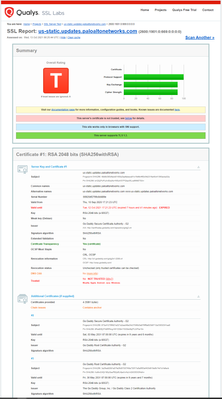
Hi, It looks like the cert on us-static.updates.paloaltonetworks.com applied on IPv6 address is expired.2600:1901:0:669:0:0:0:0. go to www.ssllabs.com and check it..option 1. Device > setup > Services > change the update server to the default.option 2 Device > setup > Services > uncheck verify update server identity.commit...
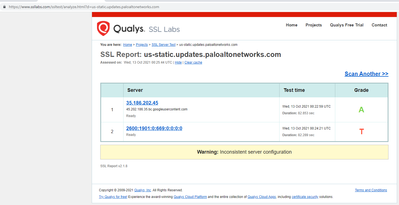
Capture.PNG
Capture2.PNG

Resolved! How to install a Cortex XDR agent communicating through the Palo Alto Networks Broker VM?

1. I installed Cortex XDR Agents before setting up the Broker VM. I want all the agents to route traffic through the Broker VM as a proxy. The Broker VM is activated and connected. Should I uninstall the existing agents and reinstall them using the following command? msiexec /i c:\install\cortexxdr.msi proxy_list="My.Network.Name:808,BrokerIP:80...

AAlsaadi by • L1 Bithead
  • 5085 Views
  • 3 replies
  • 0 Likes

unable to open a case

I have a new support account, but there appears to be a problem. URL is https://support.paloaltonetworks.com/Error/Error. I need to open a case for a critical issue.

A very weird Behavior on SIP traffic traffic reversing back to the same egress interface

Hello everyone , im seeing a very strange behaviour in my pa-445 version 11.1.4-h7 firewall , where i have an interface on the firewall which is a gateway to my voip devices , the same firewall connects to the voice server through an ipsec tunnel interface , so the traffic flow is like this , voice subnet to firewall and then from firewall to vo...

How to create ACLs for access to AWS workspaces (EDLs don't cover all IPs)

I need to create ACLs for outbound access to AWS workspaces using the destination IPs / subnets / FQDNs shown on AWS publication https://docs.aws.amazon.com/workspaces/latest/adminguide/workspaces-port-requirements.html#ip-address-regions. PAN publishes an EDL for AWS workspace, but it only contains a handful of IPs. Some of the IPs listed ...

PaloAlto Passive Firewall Monitoring in HA Setup

Hi everyone,Greetings! I’m currently using OpManager to monitor a Palo Alto firewall in an HA Active/Passive setup, and the Link State of the interfaces on the passive device is set to auto. While OpManager is able to correctly pull interface details from the active firewall, I am experiencing issues with the interface status of the passive fire...

USER111 by • L0 Member
  • 1739 Views
  • 1 replies
  • 0 Likes

Resolved! PA-1420 QinQ

Does the PA-1420 support QinQ tagging terminating at the Firewall? We have a L2 connection with an ISP to Azure and they require QinQ tagging. We do not have an ISR or other router to do it for us at this time. Thanks, Steve

smzr34 by • L0 Member
  • 2216 Views
  • 1 replies
  • 0 Likes

Resolved! OS Upgrade path to 10.2.10-h9

Hello.I am currently using PAN-820. The OS is 10.1.9-h3. What is the correct way to upgrade? (I will upgrade to 10.2.10-h9.) 1. Upgrade to 10.1.14-h6, then upload 10.2.0, then upgrade to 10.2.10-h92. Upload 10.1.14-h6 and 10.2.0, then upgrade to 10.2.10-h93. Upload 10.2.0, then upgrade to 10.2.10-h9 What is the correct way? I cannot receive ...

danudan by • L0 Member
  • 2185 Views
  • 1 replies
  • 0 Likes

GlobalProtect Portal require :443

Hi All, I have an issue where we need to input <firewall IP Address>:443 in order to connect. But some of my users does not require the :443 to connect to the VPN. Screenshot as shown below, Any way that i dont even require :443 to be connected to the VPN?

KevinNg_0-1726118355889.png
Kevin-Ng by • L2 Linker
  • 5763 Views
  • 7 replies
  • 0 Likes

Resolved! My PA-1410 logs for single day, why? how to solve?

Hello Team, My new PA-1410 logging is not more than a single day when checking the traffic logs. Previously I had PA-3220 I could checked months of logs. whats wrong here in the PA-1410 loggin settings? manager@PA-1410-Main(active)> show system logdb-quota Quotas: system: 4.00%, 0.726 GB Expiration-period: 0...

Inbound TLS/SMTP inspection (to FortiMail)

Hi,I'm wondering if anyone happens to be doing successful inbound inspection of SMTP/TLS to a FortiMail appliance? Or any other mail server for that matter. I've run in to a brick wall when it comes to renegotiation. The Palo is serving the correct certificate and a manual connections using openssl (openssl s_client -debug -connect mx1.XXXXX.co...

Screenshot 2021-02-04 at 14.43.04.png
pkaren by • L1 Bithead
  • 4325 Views
  • 2 replies
  • 0 Likes
  • 24474 Posts
  • 125 Subscriptions
Top Solution Authors
Top Liked Authors
Labels